
Low-Stock Visibility
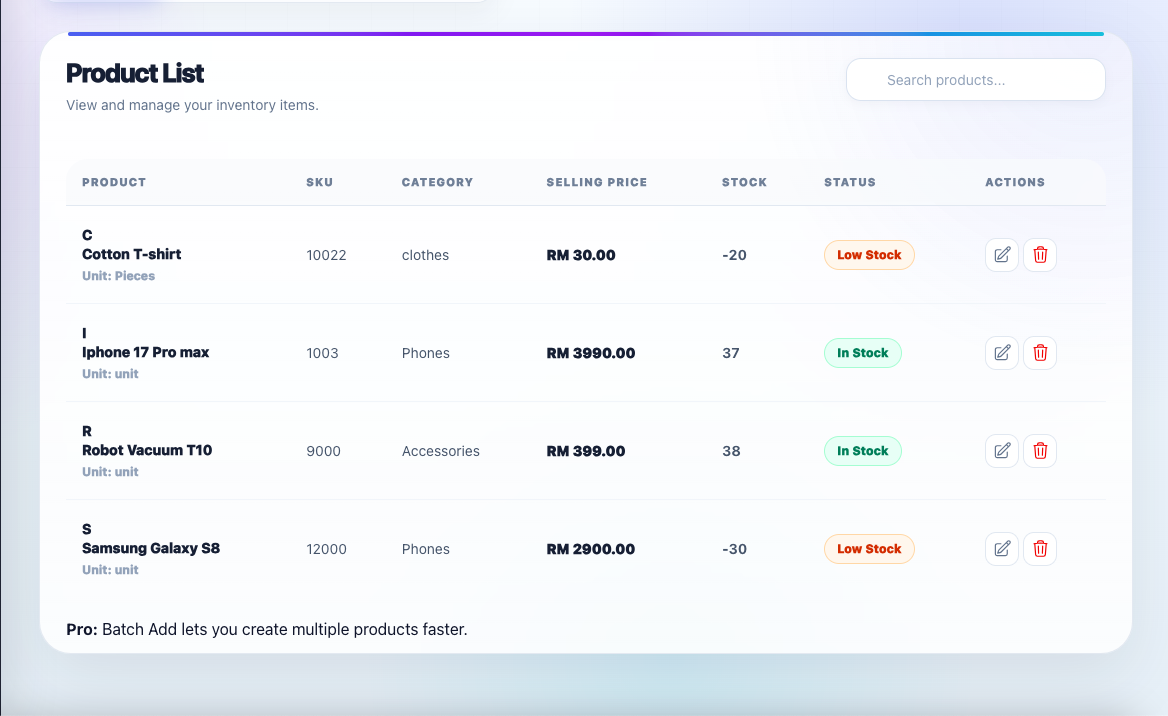
Review products that have reached or fallen below their reorder levels.
Low stock tracking software
Storly helps small businesses monitor product quantities, reorder levels, and stock movement from one clear workspace. See which products need attention before repeated manual checks turn into late restocking.
Why low-stock problems hurt small businesses
Low-stock problems often begin with a small missed update. A product sells faster than expected, incoming stock is not recorded immediately, or a spreadsheet does not clearly show which products need attention.
Once the product runs out, the business may lose sales, delay customer orders, rush supplier purchasing, or spend extra time correcting inventory records.
The goal of low-stock tracking software is not to promise perfect inventory. It is to give owners and staff earlier visibility into products that may require attention.
Storly keeps quantities, reorder levels, movement records, and low-stock products together so teams can review the situation before deciding what to restock.
Low stock tracking features
Storly combines low-stock visibility with the product and movement information needed to make a better restocking decision.
Review products that have reached or fallen below their reorder levels.
Set a reorder level for each product so the team knows when it should be reviewed.
Review stock additions, reductions, adjustments, and restocking activity before placing another order.
Review low-stock products, stock activity, and overall inventory health from one workspace.
Pro teams can use AI inventory insights and action tasks to review inventory risks more quickly.
Business teams can manage suppliers and create purchase orders for larger restocking workflows.
How low stock tracking works
Storly gives small teams a structured low-stock workflow without requiring a complicated ERP implementation.
Add products manually or import an existing product list from CSV.
Define the quantity at which each product should be reviewed.
Record stock in, stock out, adjustments, and restocks as inventory changes.
Check products that have reached their reorder level and decide what action is needed.
Signs you need low stock tracking software
These problems usually become more frequent as products, orders, and staff activity increase.
Low-stock items are noticed only after a customer asks for something that is no longer available.
Staff rely on rough estimates instead of reorder levels and recorded stock movement.
Sales, incoming stock, damage, returns, or adjustments may not be recorded consistently.
The team must manually scan files and compare quantities before identifying products at risk.
Popular products may sell out before the next manual stock review.
Different files, messages, and notebooks make it harder to understand which quantity is current.
Built for product-based small businesses
Storly is designed for small teams that manage physical products without needing heavy enterprise inventory software.
Monitor products, quantities, reorder levels, and low-stock items across daily sales.
Keep product quantities clearer and reduce overselling caused by outdated inventory records.
Review low-stock clothing, accessories, and product variations before popular items sell out.
Monitor parts and components that may be needed for customer repairs and daily operations.
Pricing
Begin with the core inventory workflow, then upgrade when your business needs team collaboration, AI, suppliers, or purchase orders.
Basic
For small businesses beginning with product and low-stock tracking.
Core stock monitoring
Pro
For growing teams that need collaboration and AI-assisted inventory review.
Team and AI workflows
Business
For teams managing suppliers, purchase orders, and larger inventory workflows.
Purchasing and control
AI inventory tools are available on Pro. Supplier management and purchase orders are available on Business.
FAQ
Common questions from small businesses evaluating a better way to monitor low-stock products.
It is software that helps a business identify products that are close to their reorder levels and review them before they run out.
It can help by giving the business earlier visibility into products that need attention. Accurate results still depend on stock changes being recorded correctly.
No system can guarantee that every stockout will be prevented. Storly helps teams identify risk earlier and make clearer restocking decisions.
Yes. You can set reorder levels so products requiring review are easier to identify.
Yes. Storly records additions, reductions, adjustments, and restocking activity.
Yes. Export your product list as CSV and import it into Storly instead of entering every product manually.
Yes. Storly includes a free Basic plan with no credit card required.
Yes. Supplier management and purchase orders are available on the Business plan.
Storly is designed for retail shops, online sellers, boutiques, repair stores, spare parts businesses, and other small teams managing physical products.
Do not wait for the next stockout
Create your free Storly workspace, add or import a few products, set their reorder levels, and begin monitoring inventory without a credit card.